

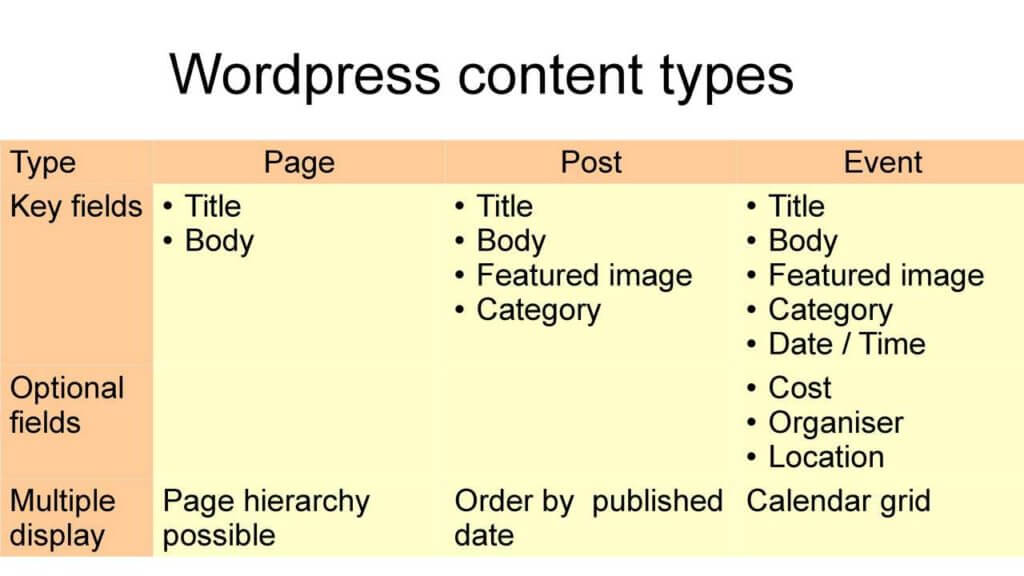
When creating content you have to decide whether to use a post or a page. If in doubt, create a post – we use pages very rarely on this site.
Posts appear in various blocks on the front page, on other pages and lists across our site. A post’s positioning is controlled by the category assigned by its author.
The special case of Group Pages
Rather confusingly, Group Pages are, in fact, Posts. We started with pages, but then we switched to posts, because they provide more flexibility and can be grouped and manipulated in more ways.
Group Pages should be assigned the Group Page category – and only that category. This makes them appear in the front page list and the Groups main page list. Assigning other categories would make them pop up in all sorts of wrong places, including in a list on the page itself, creating a circular reference.
Pages are permanent elements of the site, with content that doesn’t change much. They are not normally shown on the front page, but can only be accessed through menus.
earlier content
When creating content you have to decide whether to use a post or a page which, at first sight, appear to be the same thing. Here is an explanation of the difference between the two concepts:
Posts appear in the news feed on the main page. The latest post will appear at the top, unless you’ve designated one of the posts as “sticky“, in which case it twill stay at the top until the sticky attribute is removed.
You cannot reorder posts in the feed, but you can change their publication date, both in the past and the future, which influences their position in the feed.
Pages are permanent elements of the site, they do not appear in the feed.
Pages can be top level or nested under other pages – up to 5 levels deep.
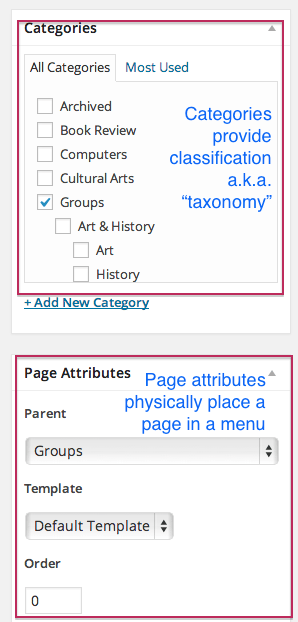
Pages appear in menus, according to the hierarchy defined by their nesting level and, within their respective level, in alphabetical order. The alphabetical order can be modified by assigning a “weighting” to the post – the higher the number, the further down the list the page will be.

Therefore, when you want to share information of a transitory nature, like, e.g. an event, you should use a post. If you want to create content which should stay on the site for the foreseeable future and be shown within the context of a menu containing similar items, you should use a page.
Categories are metadata (=information used to describe data), used to add structured elements to posts or pages: a page may be positioned in the Groups hierarchy, but the addition of one or more categories makes it possible to assign to it one or more additional content types, e.g.: History, Art, Local Events, etc.
You can create new Categories, but you do so with caution:
- Don’t duplicate existing categories
- Make sure that the name is clear and unambiguous (e.g. Event could be practically anything – too generic)
- Is it really necessary? Too many categories obscure content, rather than clarify it
- Keep categories broad – for finer details, performing a search is easier than browsing through categories
Summarising: categories help to group pages and posts according to broad criteria, but they are not a replacement for the nesting hierarchy provided by pages

The special case of Group Pages
Rather confusingly, Group Pages are, in fact, Posts. We started with pages, but then we switched to posts, because they provide more flexibility and can be grouped and manipulated in more ways.
Group Pages should be assigned the Group Page category – and only that category. This makes them appear on the front page carousel and the Groups main page list. Assigning other categories would make them pop up in all sorts of wrong pages, including in a list on the page itself, creating a circular reference.